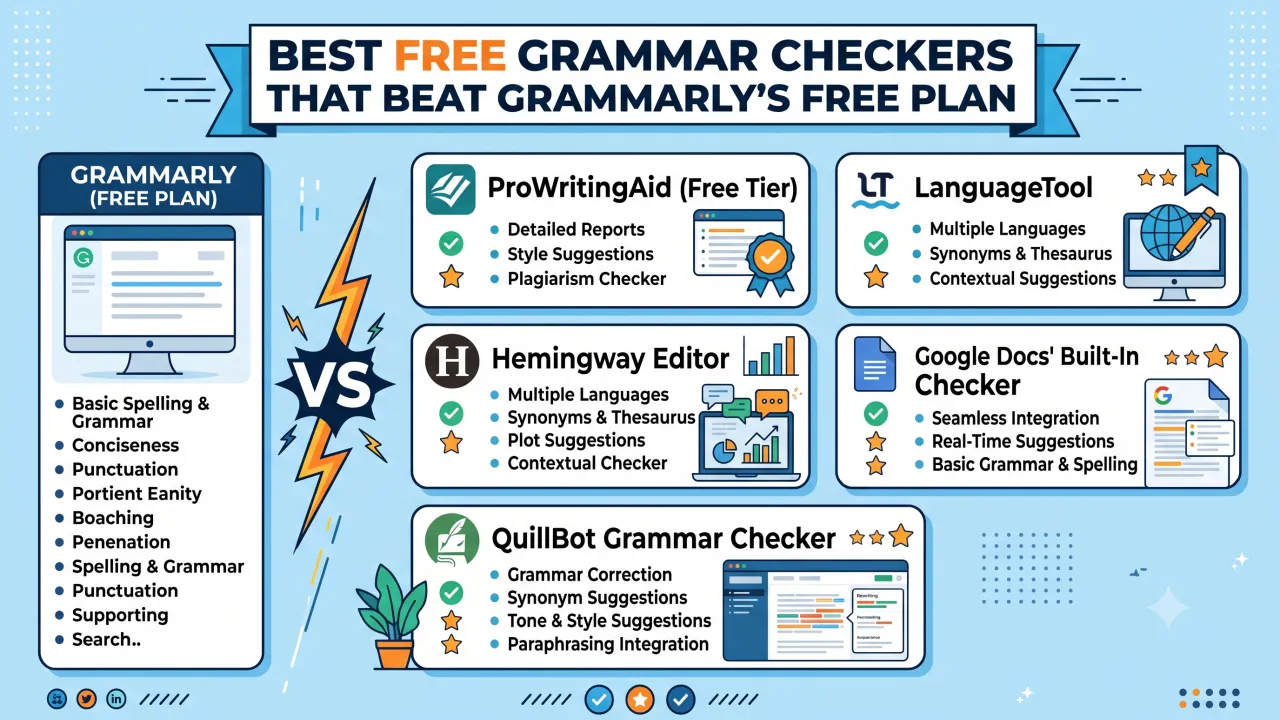
Grammarly is the name most people reach for by default, but its free tier is deliberately limited — basic spelling, grammar, and punctuation only, with tone detection, clarity rewrites, and plagiarism checks locked behind Premium. If you've hit that wall and don't want a subscription, a handful of free alternatives now genuinely outperform it in specific areas.
Where Grammarly's Free Plan Falls Short
Before comparing alternatives, it's worth being clear on what the free tier actually gives you:
- Core spelling and grammar corrections
- Basic punctuation fixes
- A limited number of "tone" suggestions
What it doesn't include for free: full clarity and conciseness suggestions, plagiarism detection, vocabulary enhancement, and most style suggestions beyond the basics — all of which sit behind the paid plan.
The Free Alternatives Worth Using
ProWritingAid (Free Tier)
Includes a genuinely broader style analysis than Grammarly's free plan — sentence length variation, overused words, and readability scoring are available without paying, though with a word-count cap per check. For long-form writers, this free tier often gives more actionable style feedback than Grammarly's equivalent.
Best for: Writers who want style and readability feedback, not just spelling and grammar.
LanguageTool
Open-source and genuinely free for unlimited use, with strong grammar and style detection across more than 20 languages. It lacks Grammarly's polished tone-detection features, but its grammar accuracy is competitive, and there's no premium paywall interrupting the free experience.
Best for: Multilingual writers and anyone who wants a distraction-free free tool without upgrade prompts.
Hemingway Editor
Not a grammar checker in the traditional sense — it doesn't catch every grammatical error — but it's unmatched for readability. It flags overly complex sentences, passive voice, and adverb overuse, which matters more for blog and web content than strict grammar rules do.
Best for: Simplifying and tightening writing for web readability, used alongside a grammar checker rather than instead of one.
Google Docs' Built-In Checker
Often overlooked, but Google's native spelling and grammar suggestions have improved significantly and now catch a reasonable range of errors for free, with zero setup and no separate account needed.
Best for: Quick checks while already writing in Docs, without installing anything.
QuillBot Grammar Checker
Free tier covers spelling, grammar, and basic style suggestions, plus a built-in paraphrasing tool that Grammarly doesn't offer for free at all. Useful if you regularly need to rephrase, not just correct.
Best for: Writers who want rephrasing suggestions alongside grammar corrections.
Which One to Actually Use
No single free tool replaces a paid Grammarly Premium subscription entirely — each free alternative is strong in one specific area rather than universally better. A practical combination for most bloggers and content writers:
- LanguageTool or Google Docs for the actual grammar and spelling pass
- Hemingway Editor for readability and sentence simplification
- ProWritingAid's free tier for a style and overused-word check on longer pieces
Running a draft through two of these takes a few extra minutes but genuinely catches more than relying on any single free tool alone.
What to Watch Out For
- Free tools with browser extensions can slow down page load and occasionally interfere with form fields on other sites — disable extensions you're not actively using.
- Word-count caps are common on free tiers (ProWritingAid limits free checks by length), so long-form writers may need to check content in sections.
- No free tool reliably catches nuanced context errors (correctly spelled wrong words, like "their" vs "there" used correctly but in the wrong context) as well as a careful human read-through — treat these tools as a first pass, not a final one.
The Bottom Line
Grammarly's free plan is fine for quick, casual writing, but it's deliberately capped to push a subscription. If you write regularly and don't want to pay, combining LanguageTool or Google Docs for grammar with Hemingway for readability covers more ground than Grammarly's free tier does on its own.
Frequently Asked Questions
Q: Is LanguageTool actually free, or does it have a hidden paywall? The core grammar and style checking is free and unlimited. LanguageTool does offer a paid "Premium" tier for additional style rules and longer document support, but the free version is fully functional on its own.
Q: Can Hemingway Editor replace a grammar checker? No. Hemingway focuses on readability — sentence complexity, passive voice, adverb use — not comprehensive grammar checking. It's best used alongside a dedicated grammar tool, not as a replacement for one.
Q: Does Google Docs' grammar checker work as well as Grammarly? It's improved significantly and catches a reasonable range of common errors for free, but it's generally less thorough than a dedicated grammar tool for nuanced style and clarity suggestions.
Q: Is QuillBot's free grammar checker good enough for professional writing? For basic grammar and spelling, yes. Its added paraphrasing feature is a genuine advantage over Grammarly's free plan, though for polished professional documents, a second readability pass is still worth doing.
Q: Do free grammar checkers catch plagiarism? Generally no. Plagiarism detection is almost always a paid feature across these tools, including Grammarly. If you specifically need plagiarism checking, you'll likely need a dedicated (often paid) plagiarism tool.
Q: Which free tool is best for non-native English writers? LanguageTool tends to perform well here due to its multilingual support and clear explanations for each suggested correction, which helps writers understand the "why" behind a fix, not just the fix itself.
The Editorial Team
We are a collective of tech enthusiasts and digital experts dedicated to making sense of the evolving digital landscape for our global audience.
Connect With Us
0 Perspectives