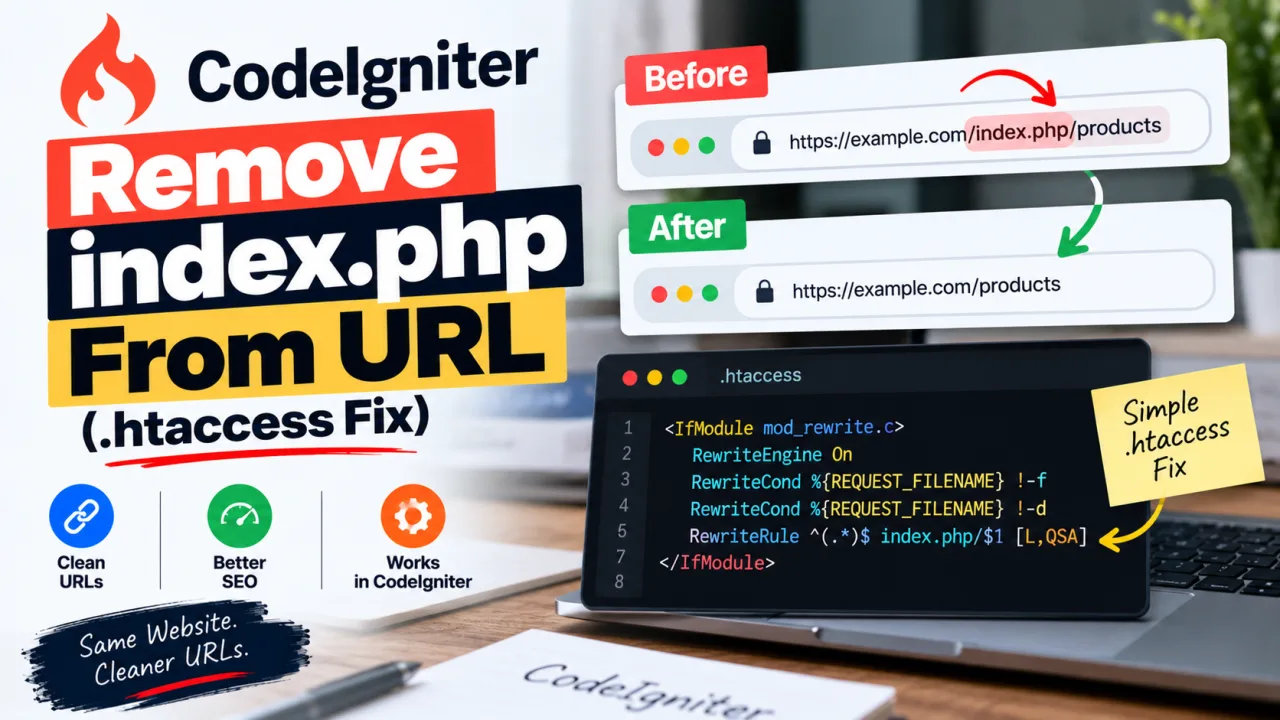
A fresh CodeIgniter install gives you URLs like example.com/index.php/blog/my-post. It works, but it looks dated, and there's a practical problem: if the clean version also resolves, you now have two addresses for every page. Search engines will happily index both.
Getting rid of index.php takes three small changes. Getting it to work on a real server is where people lose an afternoon, so this guide covers both the setup and the mistakes that usually cause the 404s.
First, check which version you're on
CodeIgniter 3 and 4 handle this differently.
- CodeIgniter 3:
index.phpsits in the project root next toapplication/andsystem/. - CodeIgniter 4: the front controller lives in the
public/folder, and your web server is supposed to point at that folder.
Open your project and see where index.php is. That tells you which section to follow.
CodeIgniter 3
1. Clear the index page in config.
In application/config/config.php:
php
$config['index_page'] = '';
2. Add an .htaccess file in the same folder as index.php:
apache
RewriteEngine On

# Send old /index.php/... URLs to the clean version
RewriteCond %{THE_REQUEST} \s/index\.php/(\S*)\s [NC]
RewriteRule ^ /%1 [R=301,L]

# Route everything else through the front controller
RewriteCond %{REQUEST_FILENAME} !-f
RewriteCond %{REQUEST_FILENAME} !-d
RewriteRule ^(.*)$ index.php/$1 [L]
The middle block is the one most tutorials skip. It 301-redirects anyone who lands on an old /index.php/... address to the clean one, so you don't end up with duplicate pages. It checks THE_REQUEST, the raw request line from the browser, so the internal rewrite below it can't trigger a loop.
3. If you still get 404s, try setting this in the same config file:
php
$config['uri_protocol'] = 'REQUEST_URI';
CodeIgniter 4
1. Point the document root at public/. On a VPS that means setting DocumentRoot to the public folder in your virtual host. Don't leave it pointing at the project root, or the app will only work at /public/.
2. Clear the index page in app/Config/App.php:
php
public string $indexPage = '';
(Older 4.x releases declare it as public $indexPage = 'index.php';. Same property, just change the value.)
3. Use the .htaccess that ships in public/. The default file already contains the rewrite you need. The core of it is:
apache
RewriteEngine On

RewriteCond %{REQUEST_FILENAME} !-f
RewriteCond %{REQUEST_FILENAME} !-d
RewriteRule ^([\s\S]*)$ index.php/$1 [L,NC,QSA]
If you deleted or replaced that file, restore it from a fresh install.
Shared hosting. Many shared hosts force your domain to point at public_html, and you can't change that. The usual workaround is to keep the framework folders outside public_html, copy the contents of public/ into it, and update the paths in index.php so they point at your app and system folders. It's fiddly, but it also keeps your source code out of the web root, which is the safer setup anyway.
Make sure Apache is allowed to rewrite
Two server settings have to be on, and shared hosts usually have both. On your own server, check them:
bash
sudo a2enmod rewrite
sudo systemctl restart apache2
Then confirm the virtual host contains AllowOverride All for your site's directory. With AllowOverride None, Apache ignores .htaccess entirely, and every clean URL returns 404 no matter how correct the file is.
Nginx
Nginx doesn't read .htaccess. The equivalent goes in your server block:
nginx
location / {
    try_files $uri $uri/ /index.php$is_args$args;
}
That works for CodeIgniter 4. On CodeIgniter 3, also set uri_protocol to REQUEST_URI as shown above.
The mistakes that cause most 404s
Rules that never run. If you edit .htaccess by commenting out old blocks, check that the rules you added sit inside a block that's actually active. I once added redirects underneath a section whose opening line had a # in front of it. The rules were never read, and I spent a while debugging redirects that did nothing. Open the file and look at every line's neighbours.
Controller file names. On Windows and macOS, blog.php and Blog.php are the same file. On a Linux server they are not. CodeIgniter 3 expects controller files to start with a capital letter. A site that works locally and 404s after deployment is very often this.
The file isn't where you think it is. A leading dot hides .htaccess in most file managers and some FTP clients skip hidden files during upload. Confirm it exists on the server, in the right folder.
Wrong folder for a subdirectory install. If your app lives in /subfolder/, the rewrite needs to know that. Add RewriteBase /subfolder/ near the top. For a site at the domain root, RewriteBase / is correct, or you can leave the line out.
Redirect loops. A rule that strips trailing slashes combined with a framework route that adds them will bounce forever. If you see "too many redirects", disable your custom redirects one at a time and test after each.
Syntax errors. One bad line in .htaccess returns a 500 error for the whole site. The Apache error log tells you which line. If you're also seeing server errors in Search Console, read our guide to fixing 5xx errors.
Test it
Two quick checks from a terminal:
bash
# Clean URL should return 200
curl -I https://example.com/about

# Old URL should return 301 and point to the clean one
curl -I https://example.com/index.php/about
If the first one returns 404, the rewrite isn't running. If the second returns 200, your redirect block is missing or being skipped.
Frequently Asked Questions
Does removing index.php help SEO? It helps indirectly. Clean URLs are easier to read and share, and redirecting the old versions prevents search engines from treating two addresses as separate pages.
Why do I get a 404 for every page except the homepage? The rewrite isn't being applied. Check that mod_rewrite is enabled, that AllowOverride All is set, and that the .htaccess file is in the same folder as index.php (or public/ for CodeIgniter 4).
Can I do this without .htaccess? Yes, with equivalent rules in your Apache virtual host or an Nginx try_files directive. Putting rules in the server config is slightly faster, but .htaccess is the only option on most shared hosts.
My site works on localhost but not on the live server. Why? The usual causes are case-sensitive file names on Linux, AllowOverride set to None, or a missing hidden .htaccess file after upload.
Do I need to redirect the old index.php URLs? If those URLs have ever been public or linked, yes. Without a 301, both versions stay live and both can be indexed.
Is the CodeIgniter 4 setup different? Yes. The front controller is in public/, the document root should point there, and the default .htaccess is already included. You mainly need to set $indexPage to an empty string.

The Editorial Team
We are a collective of tech enthusiasts and digital experts dedicated to making sense of the evolving digital landscape for our global audience.
Connect With Us

0 Perspectives