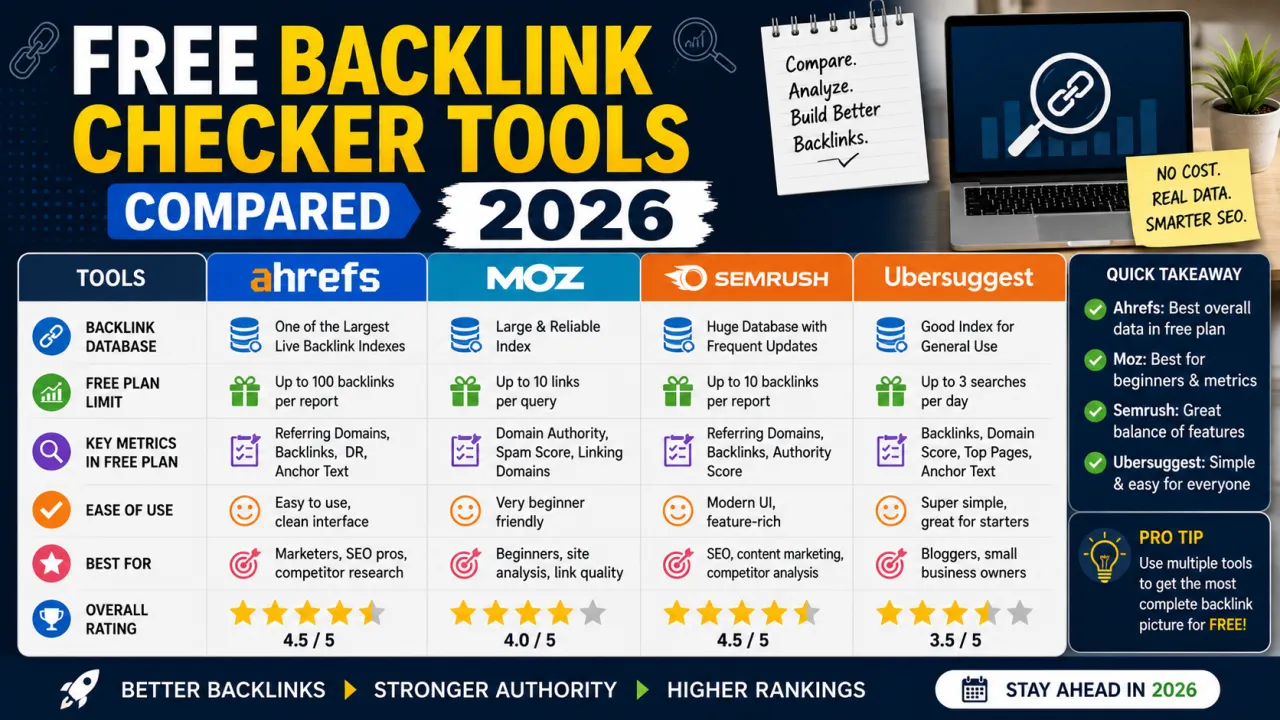
Backlinks are still one of the strongest ranking signals Google uses, which is exactly why every major SEO tool locks the good backlink data behind a paywall. But you don't need a £99/month subscription to get a working picture of your link profile — you just need to know which free tools actually give you real data, and which ones show you a teaser and ask for a credit card.
Here's what we found after testing the current crop of free backlink checkers.
What "Free Backlink Checker" Actually Means in 2026
Almost every major SEO platform (Ahrefs, Semrush, Moz) offers a free backlink checker as a lead-generation tool. That means:
- You'll typically see your top 5–100 backlinks, not the full list
- Domain Authority / Domain Rating scores are usually included even in the free tier
- Historical data (backlinks lost or gained over time) is almost always paywalled
- Exporting data to CSV is usually a paid feature
Knowing this in advance changes how you should use these tools — as a spot-check and competitor snapshot, not a full link-building dashboard.
The Tools Worth Using
Ahrefs Free Backlink Checker
Shows up to 100 backlinks per domain, plus Domain Rating and top linking pages. The data quality is generally considered the industry benchmark, which makes it useful even in its limited free form — particularly for a quick check of a competitor's strongest referring domains.
Best for: A fast, high-quality snapshot of any domain's backlink profile.
Semrush Backlink Analytics (Free Tier)
Gives a broader top-line view — total backlinks, referring domains, and authority score — with a capped number of results before it asks you to sign up or upgrade. The free tier is enough to sanity-check whether a domain has an active link profile at all.
Best for: Quick authority comparisons between your site and a competitor's.
Moz Link Explorer (Free)
Moz's free tier includes Domain Authority and Page Authority scores, which remain widely referenced even though Google doesn't use them directly. Useful as a rough proxy metric, less useful for granular link data.
Best for: A quick DA/PA gut-check, not deep analysis.
Ubersuggest
Neil Patel's tool includes a backlink overview with a small number of free lookups per day. Data depth is thinner than Ahrefs or Semrush, but it's genuinely free without needing a credit card for a trial.
Best for: Occasional checks without any signup friction.
Google Search Console (Your Own Site Only)
Often overlooked, but it's the only tool on this list with 100% accurate data — because it's coming directly from Google. Under Links > Top linking sites, you get a full, real list of who links to you, no caps, completely free. The limitation is it only works for your own verified property, not competitors.
Best for: The most accurate check of your own site's backlinks, full stop.
How to Actually Use This Data
Checking backlinks is only useful if it changes what you do next. A few practical applications:
- Competitor gap analysis. Run a competitor's top-ranking page through a free checker and note which referring domains you don't have. Those are realistic outreach targets.
- Spot toxic links early. Free tools rarely include a full toxicity score, but a quick scan of unfamiliar linking domains can flag spammy sites worth disavowing.
- Confirm guest posts and outreach actually landed. After a guest post goes live, check Search Console or a free tool to confirm the link is live, dofollow, and pointing where you expect.
- Track your own growth over time. Even without historical data in free tools, taking a monthly screenshot of your Search Console linking domains gives you your own trend line for free.
When It's Worth Paying
If you're doing active link building — outreach campaigns, competitor gap analysis at scale, or tracking lost/gained links over time — a paid tool pays for itself quickly. But for the average site owner checking in monthly, the free tiers above (especially combined with Search Console) cover 90% of what you actually need.
The Bottom Line
No single free tool gives you the complete picture, but stacking two or three — Ahrefs for a quality snapshot, Search Console for your own accurate data, and Ubersuggest for quick daily checks — gets you most of the way there without a subscription.
Frequently Asked Questions
Q: Which free backlink checker gives the most accurate data? For your own site, Google Search Console is the most accurate, since it's Google's own data. For competitor research, Ahrefs' free tier is generally regarded as the most reliable third-party source.
Q: Can I see all of a competitor's backlinks for free? No. Every third-party tool caps the number of results in its free tier. You'll see a useful sample, not the full list — full data requires a paid plan.
Q: What's the difference between Domain Authority and Domain Rating? Domain Authority (DA) is Moz's metric; Domain Rating (DR) is Ahrefs' equivalent. Neither is used directly by Google — they're third-party proxy scores useful for rough comparisons, not ranking factors themselves.
Q: Do I need a backlink checker if I only publish content and don't do outreach? It's still worth checking periodically. Sites naturally attract unsolicited links and mentions over time, and you'll also want to catch any toxic or spammy links pointing at your domain.
Q: How often should I check my backlinks? Monthly is reasonable for most sites. If you're actively running outreach or guest posting campaigns, checking weekly helps confirm links go live as expected.
Q: Are paid backlink checkers worth it for a small blog? Usually not, unless you're running active link-building campaigns. For most small sites, Search Console plus a free third-party tool covers what you need.

The Editorial Team
We are a collective of tech enthusiasts and digital experts dedicated to making sense of the evolving digital landscape for our global audience.
Connect With Us
0 Perspectives