Ask ten different SEO experts how long your blog post should be, and you'll get ten different answers. "1,500 words." "2,000 minimum." "As long as it needs to be." That last one is technically true and completely useless if you're staring at a half-finished draft trying to decide whether to keep going or wrap it up.
So let's actually answer the question, with real numbers tied to real content types — instead of one magic number pretending to apply to everything you'll ever write.
Why There's No Single Right Answer
Word count isn't a ranking factor on its own. Google has said this directly, and you can verify it yourself: search almost any topic and you'll find both a 600-word page and a 3,000-word page sitting in the top five results. What predicts ranking is whether the content fully answers what the searcher wanted — and sometimes that takes 400 words, sometimes it takes 4,000.
The reason longer content often ranks better isn't length itself. It's that longer, well-structured content tends to cover a topic more thoroughly, which naturally captures more related search terms and keeps people on the page longer — both of which Google's algorithm picks up on indirectly.
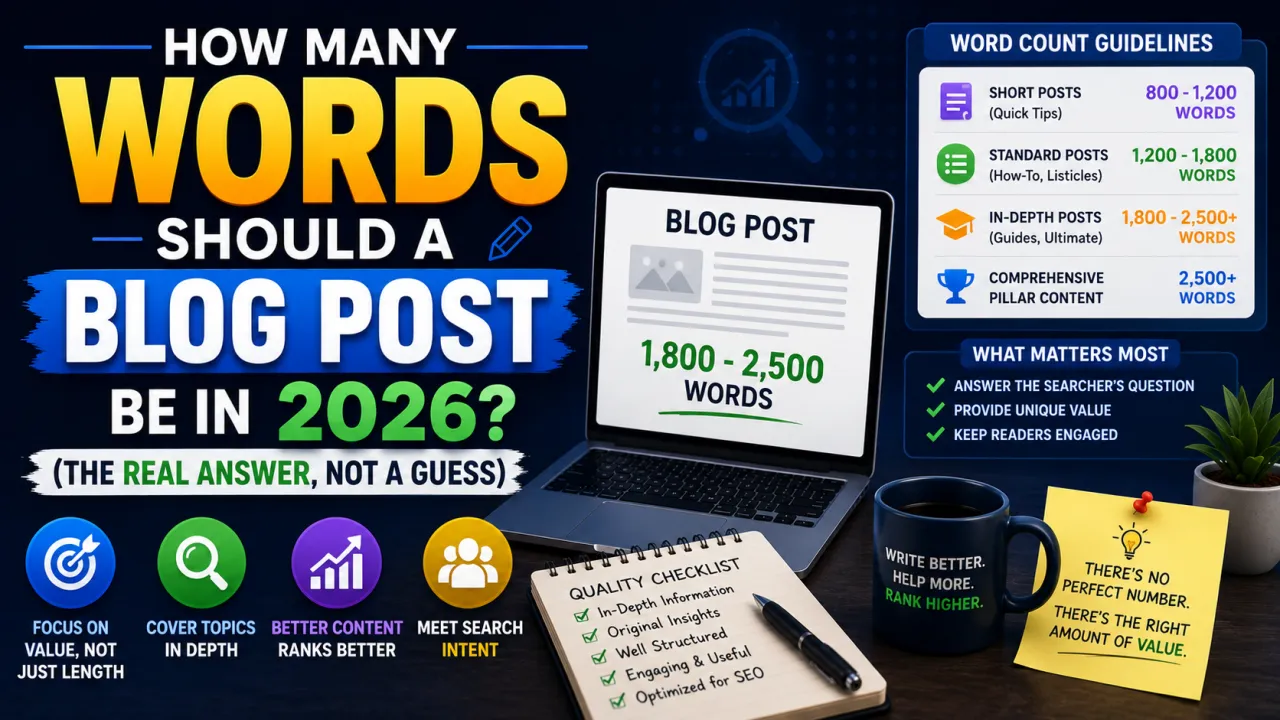
Word Count by Content Type (The Actual Ranges That Work)
Quick-answer posts (300–600 words). If someone is searching "what time zone is London in" or "how to clear cache on iPhone," they want a fast, direct answer. Padding this out to 2,000 words doesn't help anyone — it just makes them scroll past your introduction looking for the actual answer, which often means they leave and try someone else's page instead.
Standard how-to guides (1,000–1,800 words). This is the sweet spot for most practical content — "how to start a budget," "how to fix a slow laptop," "how to write a cover letter." Enough room to cover the steps properly, add context, and answer likely follow-up questions, without dragging the reader through filler.
Comprehensive guides and listicles (1,800–3,000 words). Anything competing for a broad, high-volume keyword ("best credit cards," "best laptops under $500," "complete guide to X") usually needs to go deeper, because you're competing against other sites that have already gone deep. These posts often outrank shorter competitors specifically because they answer more of the follow-up questions a reader would have, on the same page, without making them search again.
Pillar or cornerstone content (3,000+ words). Reserved for topics you want to become the definitive resource on — usually one or two per site, not something you do every week. These take significant time to write properly and are meant to be referenced and updated for years, not published and forgotten.
The Mistake of Padding for the Sake of a Number
Here's where good intentions go wrong. A lot of writers read "aim for 1,500 words" somewhere, hit 900 words with a genuinely complete answer, and then pad the rest with repeated points, unnecessary examples, or a bloated FAQ section just to hit the target.
Readers notice this immediately. They feel like they're being made to scroll through filler to find what they already got three paragraphs ago — and that's exactly the kind of experience that makes someone bounce off your page, which tells Google your content didn't actually satisfy the search. Ironically, padding to "improve SEO" often hurts it.
The better question isn't "how many words do I need?" It's "have I actually finished answering the question?" Sometimes that happens early. Sometimes it takes 2,500 words. Let the topic decide, not an arbitrary target.
A Practical Way to Decide for Your Own Post
Before you start writing, look at what's already ranking on page one for your target keyword. Not to copy it — to understand what depth Google has already decided is "complete" for that particular search. If every top result is 2,000+ words covering five distinct subtopics, a 600-word post probably won't compete, no matter how well-written it is. If the top results are short and direct, you don't need to force extra length just to look thorough.
Then, once your draft is done, check it against a simple gut check: did you answer the main question, the obvious follow-up questions, and give the reader something they couldn't get from a five-second AI summary? If yes, you're probably at the right length — whatever number that turns out to be.
Checking Your Count as You Write
It helps to keep an eye on your word count while drafting, not just at the end — it gives you a sense of pacing, so you're not suddenly realizing at 400 words that you've barely covered half your outline, or at 3,000 words that you've said the same thing four different ways. A simple word counter running alongside your draft makes this easy to track without breaking your writing flow to do mental math.
What This Means for Your Content Calendar
Not every post on your site needs to be a 2,000-word epic. In fact, a healthy content strategy usually mixes lengths intentionally — quick, useful short posts that answer specific questions fast, alongside a smaller number of deep, comprehensive guides that aim to be the best resource on a competitive topic.
Trying to make every single post "long enough to rank" usually backfires, either through padding that hurts engagement, or through burnout from forcing length onto topics that didn't need it. Match the depth to the question, write until you've genuinely finished, and let the word count land wherever that takes you.
That's a far more reliable formula than chasing a number someone else decided was the rule.

The Editorial Team
We are a collective of tech enthusiasts and digital experts dedicated to making sense of the evolving digital landscape for our global audience.
Connect With Us

0 Perspectives