You've done everything right. You researched the keyword, wrote a solid 1,500-word article, got it indexed, and there it is — sitting in the search results. Position 6. Position 4. Maybe even position 2.
And nobody clicks on it.
This happens more often than people admit, and it's almost never because the content is bad. It's because the title and description sitting in the search results don't give anyone a reason to click. Google ranks your page based on relevance and quality, but the click itself is a completely separate decision — one made entirely by a human scanning ten blue links in about three seconds.
Let's fix that.
Why Your Title Tag Is Doing More Work Than You Think
Your title tag is the first thing a person reads about your page. Before your headline, before your images, before a single word of your actual content. If it doesn't immediately tell them "yes, this is what I'm looking for," they move to the next result.
Here's the part most people get wrong: they write title tags like a librarian cataloguing a book, instead of writing them like a person trying to win someone's attention. Compare these two:
Weak: Best Laptops 2026 | TechBlog Better: 9 Best Laptops Under $700 in 2026 (Tested by Real Users)
The second one tells you exactly what you're getting, gives you a number to anchor on, and adds a small trust signal ("tested by real users"). Same topic, completely different click appeal.
The Anatomy of a Title That Converts
Most high-performing title tags include at least two of these elements:
A number. "7 Ways," "12 Tools," "5 Mistakes." Numbers create a clear promise — the reader knows exactly what they're getting and roughly how long it'll take to read.
A specific outcome. Not "Tips for Saving Money" but "Cut Your Grocery Bill by $200 a Month." Specificity beats vagueness every single time, because vague titles could be about anything, and people don't click on "could be about anything."
A timeframe or freshness signal. Adding the year (2026) tells searchers your content is current — genuinely important for topics where things change, like software tools, prices, or "best of" lists.
A point of difference. Words like "actually," "honestly," "no fluff," or "tested" signal that you're not just rehashing what everyone else wrote. People are tired of generic content, and your title can promise something different.
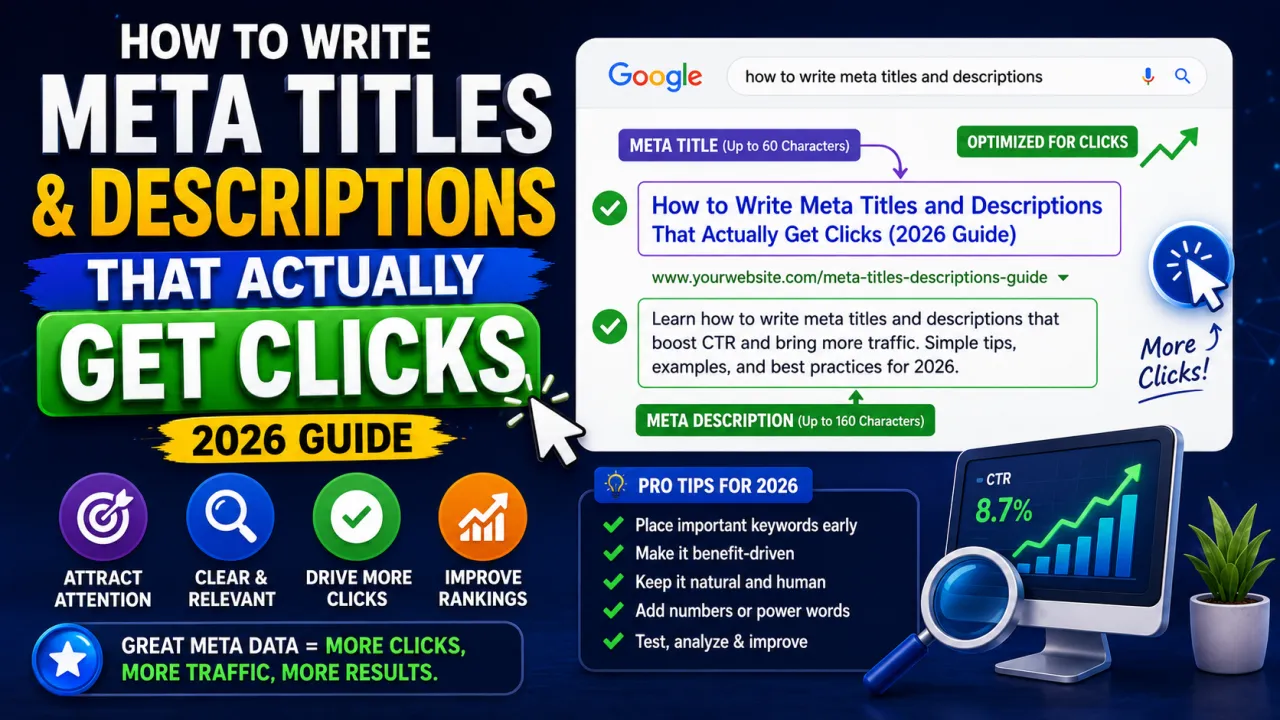
Keep your title under 60 characters where possible. Google generally cuts off titles around 580–600 pixels, which roughly translates to 55–60 characters depending on which letters you use. Go over that and your carefully chosen ending gets replaced with "..." — which defeats the purpose.
Meta Descriptions: The Underrated Sales Pitch
If the title tag is the headline, the meta description is the elevator pitch. It's your one shot to explain why someone should pick your result instead of the nine others sitting next to it.
A lot of people skip writing custom meta descriptions, figuring Google will just pull a snippet from the page anyway. Sometimes it does. But when you leave it blank, you're handing control of your first impression over to an algorithm that has no idea what makes your content special. Write your own, every time.
A good meta description does three things in under 160 characters: it acknowledges the problem the searcher has, it hints at the solution your page provides, and it gives a reason to act now rather than later.
Here's a real example of the difference:
Generic: This article covers tips for writing meta descriptions for your website and blog posts to improve SEO performance.
Better: Struggling to get clicks despite ranking well? These meta description tips (with real examples) show you exactly what to fix — in under 5 minutes.
The second version speaks directly to the frustration ("ranking well but no clicks"), promises a fast fix, and feels like it was written by a person who understands the problem — not a content management system filling in a template.
Common Mistakes That Quietly Kill Your CTR
Stuffing keywords instead of writing for humans. Google has been smart enough to understand context for years now. "Best Cheap Laptops Affordable Budget Laptops 2026" reads like spam and nobody trusts a spammy-sounding result.
Writing the same title for every page. If five articles on your site all start with "Ultimate Guide to...", you're not just confusing Google about which page matches which search — you're also training your own readers to skim past your results because they all look identical.
Ignoring search intent. A title that promises a comparison ("X vs Y") needs to actually compare. If someone clicks expecting a side-by-side breakdown and finds a single product review instead, they'll bounce immediately — and that bounce tells Google your page wasn't actually a good match, which hurts your ranking over time.
Forgetting mobile users. More than 60% of search traffic in both the US and UK happens on mobile devices, where less of your title is visible before truncation. Front-load the important words.
A Simple Process You Can Repeat for Every Page
Before writing your title and description, answer one question honestly: if you were the searcher, scrolling through ten results, why would you click this one over the others?
If you can't answer that in one sentence, the title needs work. Write three or four versions, read them out loud, and pick the one that sounds like something a real person would actually want to click — not something generated to satisfy a character count.
Once you've drafted it, run it through a meta tag generator to double-check your character counts and see exactly how it'll render in search results before you publish. It takes the guesswork out of whether your title will get cut off, and lets you preview both desktop and mobile versions side by side.
The Bigger Picture
Ranking and clicking are two separate battles, and most SEO advice only talks about the first one. But a page sitting at position 3 with a 2% click-through rate is often outperformed by a page at position 6 with an 8% click-through rate — simply because more real people are choosing to visit it.
The good news is that fixing this doesn't require touching your content, your backlinks, or your site structure. It just requires treating your title and description like the advertisement they actually are — because that's exactly what they're competing against on the results page.
Go back through your last ten published posts this week. Check their titles and descriptions against everything above. You'll likely find at least two or three you can rewrite in under ten minutes — and those small edits often produce the fastest, most visible jump in traffic you'll see from any single SEO task.

The Editorial Team
We are a collective of tech enthusiasts and digital experts dedicated to making sense of the evolving digital landscape for our global audience.
Connect With Us

0 Perspectives