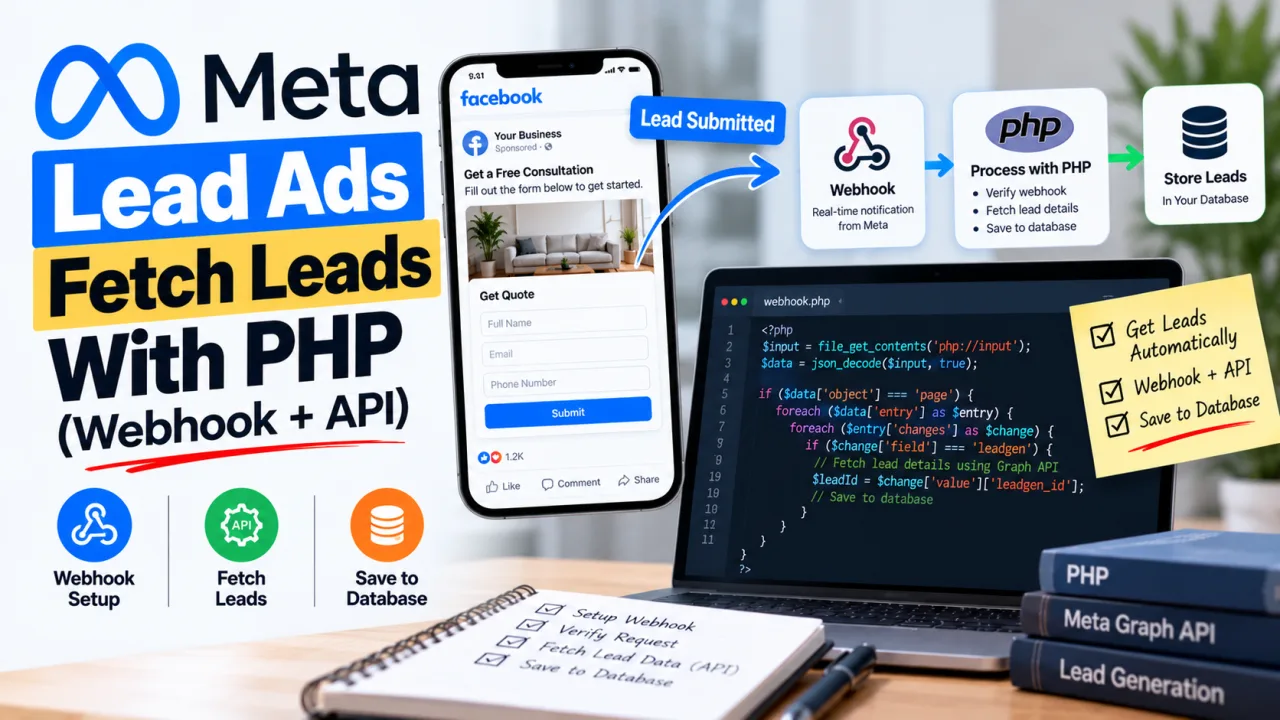
If you run lead ads for a client, the default setup is a CSV you download from Facebook now and then. That works until someone asks why a lead from Tuesday morning was only called on Thursday. Speed matters with leads, and the fix is not complicated: have Meta tell your server the moment a form is submitted, then fetch the lead details automatically.
This guide covers the full path in plain PHP: the webhook, the verification handshake, signature checks, and the Graph API call that returns the lead's answers. The same logic carries over to Laravel, CodeIgniter or any other framework.
How the flow works
- Someone submits your lead form on Facebook or Instagram.
- Meta sends a webhook to your server. The payload contains a
leadgen_id, the form ID, the page ID and an ad ID. It does not contain the person's answers. - Your server calls the Graph API with that
leadgen_idand a Page access token. - The API returns the lead's
field_data: name, email, phone and whatever else the form collected. - You store it or push it into your CRM.
The two-step design is deliberate. The webhook is only a notification, and the personal data stays behind an authenticated call.
What you need before you start
- A Meta developer app and a Facebook Page that runs the lead ads
- A public HTTPS URL for your webhook endpoint (Meta won't call plain HTTP)
- A Page access token for the Page that owns the forms
- Your app secret, for verifying signatures
- The right permissions. Meta's Lead Ads retrieval documentation lists the current set, and it has changed over time. Expect at least
leads_retrieval,pages_show_listandpages_read_engagement, pluspages_manage_metadatafor subscribing the app to the Page. - Lead access for whoever generated the token. In the Page's or Business Manager's settings, the person (or system user) needs permission to access leads. A missing grant here is a common cause of empty or failing requests.
Two caveats on access. While the app is in development mode it only receives leads submitted by people with a role on the app. To receive real leads from the public, the app needs to be live and the permissions need approval through App Review. Plan for that early, since review takes time.
Step 1: Build the endpoint
One file handles both jobs: answering Meta's verification request (a GET) and receiving lead notifications (a POST).
php
 true,
        CURLOPT_TIMEOUT        => 15,
    ]);
    $body = curl_exec($ch);
    curl_close($ch);

    $lead = json_decode((string) $body, true);
    if (empty($lead['field_data'])) {
        error_log("Lead {$leadId}: no field_data returned: " . $body);
        return;
    }

    // Turn [{name: 'email', values: ['a@b.com']}, ...] into ['email' => 'a@b.com']
    $fields = [];
    foreach ($lead['field_data'] as $f) {
        $fields[$f['name']] = $f['values'][0] ?? null;
    }

    // Save with a prepared statement, or push to your CRM.
    // Use $leadId as a unique key so duplicate deliveries don't create duplicate rows.
}
Keep the tokens in environment variables, not in the file and never in a repository.
Step 2: Register the webhook in your app
In the Meta developer dashboard, add the Webhooks product, choose the Page object, and enter your callback URL and the verify token you picked. Meta immediately sends the GET request from the code above. If your endpoint echoes the challenge back, the subscription is accepted. Then subscribe to the leadgen field.
Step 3: Subscribe the app to the Page
Registering the webhook isn't enough. The app also has to be subscribed to the specific Page:
bash
curl -X POST "https://graph.facebook.com/{VERSION}/{PAGE_ID}/subscribed_apps" \
  -d "subscribed_fields=leadgen" \
  -d "access_token={PAGE_ACCESS_TOKEN}"
A successful response is {"success": true}. Skipping this step is the most common reason a webhook is verified but never fires.
Step 4: Test with the Lead Ads Testing Tool
Meta provides a Lead Ads Testing Tool in its developer tools. Pick your Page and form, submit a test lead, and watch your server log. You should see the notification arrive within seconds, followed by the Graph API fetch. Test leads are clearly marked, so they're easy to filter out later.
The errors you're most likely to hit
Verification fails. Three usual causes: reading hub.challenge instead of hub_challenge (PHP converts the dot), printing anything other than the raw challenge value (stray HTML, whitespace or a BOM at the top of the file), or a verify token mismatch.
Signature mismatch. Compute the HMAC on the raw request body, not on re-encoded JSON, and use the app secret, not the app ID. Reading the body through a framework that has already parsed it is a classic way to get this wrong.
A permissions error (code 200 or 190). The token is missing a permission, belongs to someone without lead access, or has expired. For production, use a long-lived Page token or a system user token, and plan for rotating it.
Webhook never fires. Check that the app is subscribed to the Page (Step 3), that the app is live if you expect real leads, and that the lead wasn't submitted by someone without an app role while in development mode.
Duplicate leads. Webhooks can be delivered more than once. Store the leadgen_id with a unique constraint so a repeat is harmless.
Slow responses. Meta expects a fast reply. If your handler does heavy work (CRM calls, emails), respond 200 first, as the code does, or push the job onto a queue.
A note on the data
A lead form collects personal information. Store only what you need, restrict access, and make sure your privacy notice and the form's consent text match what you actually do with the data. If your clients are in the UK or EU, that includes GDPR obligations.
Make it more useful
Once leads land on your server, you can do more than store them. Send a confirmation email, create the CRM record, or alert the sales team. If you want a push notification on a phone the second a lead arrives, our guide to sending Firebase push notifications with PHP pairs well with this setup.
Frequently Asked Questions
Does the webhook include the lead's name and email? No. It contains identifiers (leadgen_id, form ID, page ID, ad ID). You fetch the answers with a separate Graph API request using the leadgen_id.
Do I need webhooks, or can I just poll the API? You can poll the form's leads endpoint on a schedule, but webhooks are faster and avoid repeated requests. A common pattern is webhooks for speed and a periodic poll as a safety net for anything missed.
Why do I need App Review? While your app is in development mode, it only works for people with a role on the app. To receive leads from the general public, the app needs to be live and the lead permissions need approval.
Which access token should I use? A Page access token for the Page that owns the form, ideally long-lived, or a system user token for server-to-server use. A short-lived user token will expire and break your integration.
Can I send leads to a CRM instead of a database? Yes. The handleLead function is the place for it: map the fields and call your CRM's API, or write to a queue that another worker processes.
How do I stop duplicate leads? Use the leadgen_id as a unique key in your storage. If the same webhook arrives twice, the second insert is rejected or ignored.

The Editorial Team
We are a collective of tech enthusiasts and digital experts dedicated to making sense of the evolving digital landscape for our global audience.
Connect With Us
0 Perspectives