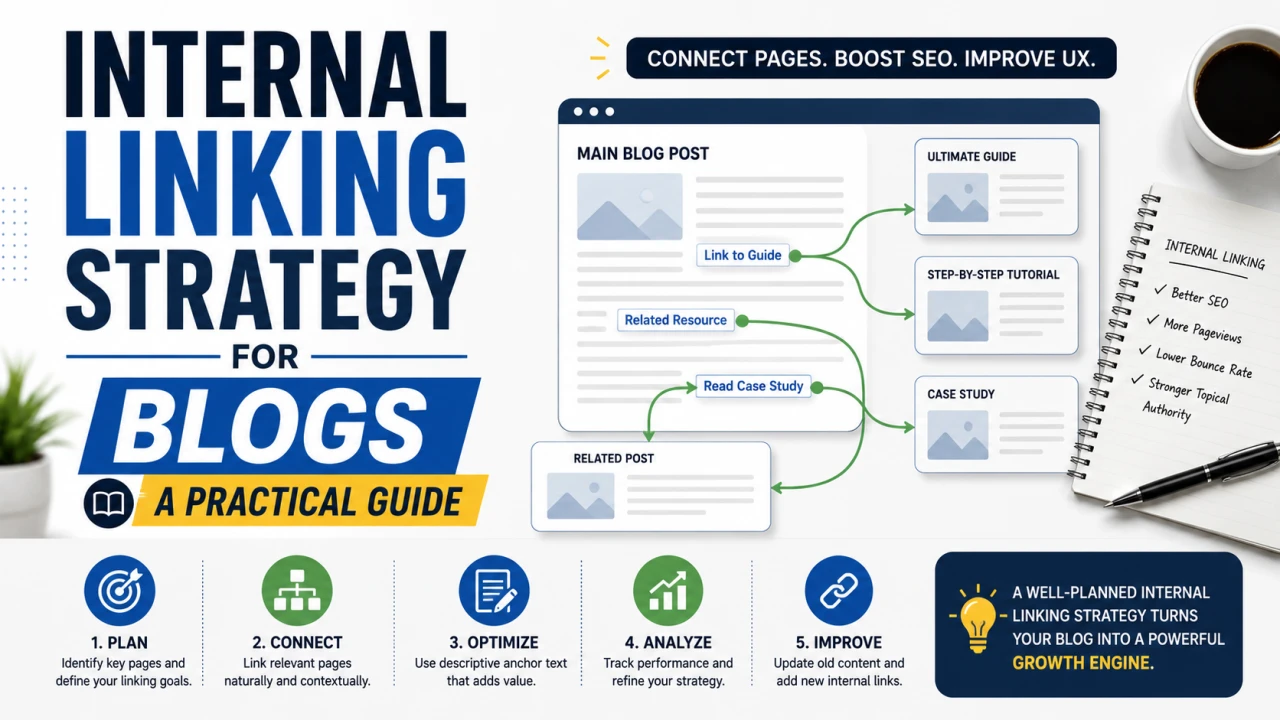
Most blogs treat internal linking as an afterthought — a courtesy link dropped in near the end of a post because it feels like the right thing to do. That's a mistake. Internal linking is one of the few SEO levers you have 100% control over, with no algorithm update, backlink budget, or competitor behaviour involved. Done properly, it's often the fastest way to move a stuck page from position 15 to position 5.
Why Internal Links Matter More Than Most Writers Realise
Internal links do three distinct jobs at once:
- They pass authority between pages. A page with strong backlinks and rankings can lend some of that authority to a newer or weaker page it links to.
- They tell Google what a page is about. The anchor text you use is a direct signal — "keyword density checker" as anchor text tells Google far more about the linked page's topic than "click here" does.
- They control crawl depth. Pages buried deep in your site structure, with no internal links pointing to them, are far less likely to be crawled frequently or indexed at all.
If you've ever had a page with real potential that just never seemed to rank, weak internal linking is one of the most common — and most fixable — reasons why.
The Core Rules
Link From Strong Pages to Weak Ones
Your highest-traffic, highest-authority pages are your most valuable internal linking assets. Every time you publish something new, go back to your 3-5 best-performing posts and add a contextual link to the new piece. This is more effective than the reverse — linking from a brand-new, unranked post to an already-strong one does very little for the strong page, which doesn't need the help.
Use Descriptive, Varied Anchor Text
Avoid "click here" and "read more" as anchor text — they carry no topical signal. Instead, use anchor text that describes what the linked page is actually about, and vary the phrasing naturally across different links rather than using the exact same anchor text every time you link to the same page.
Don't Over-Link a Single Page
There's no universal magic number, but cramming 20+ internal links into a single post dilutes the value each one passes and creates a poor reading experience. A practical range for most blog posts is 3-8 contextual internal links, placed where they genuinely help the reader, not stuffed in for SEO's sake.
Link Contextually, Not Just in a "Related Posts" Box
An automated related-posts widget at the bottom of an article is better than nothing, but it carries far less weight than a link placed naturally within a sentence, in context, because Google treats in-content links as a stronger relevance signal than boilerplate widget links repeated across every page.
Finding and Fixing Orphan Pages
An orphan page is any page on your site with zero internal links pointing to it. These pages are frequently under-indexed or crawled rarely, no matter how good the content is.
How to find them:
- In Google Search Console, cross-reference your full list of indexed URLs against a site crawl (tools like Screaming Frog have a free tier that handles this) to spot pages with no internal inlinks
- Check your CMS for posts published more than a few months ago that have never been linked from anything newer
How to fix them:
- Add at least 2-3 contextual internal links to every orphan page from relevant, already-indexed content
- Add the page to your site's navigation or a relevant category/hub page if it fits thematically
- Include it in your XML sitemap if it isn't already there
Building Topic Hub Structures
For sites with many posts on related subjects (which describes most content-heavy blogs), grouping content into hub-and-spoke structures pays off significantly:
- Identify a broad topic with several related posts already published (for example, everything related to "SEO basics")
- Create or designate one comprehensive "hub" page or pillar post on that broad topic
- Link from the hub to every related "spoke" post, and link back from each spoke post to the hub
- Link spoke posts to each other where genuinely relevant, not forced
This structure concentrates topical authority, makes it much easier for Google to understand the full breadth of your coverage on a subject, and gives readers a clear path to related content instead of a dead end at the bottom of one post.
A Simple Monthly Internal Linking Routine
- Every time you publish a new post, spend 10 minutes adding links to it from 3-5 older, higher-performing related posts
- Once a quarter, run a site crawl to check for orphan pages and broken internal links
- Review your top 10 traffic pages and confirm they're linking out to newer or underperforming content that could benefit from the authority
The Bottom Line
Internal linking is unglamorous compared to backlink outreach or keyword research, but it's the SEO lever entirely within your control, with no dependency on anyone else's decisions. A consistent, contextual internal linking habit — not a one-time cleanup — compounds over time and is often the single fastest fix for pages that are ranking on page 2 or 3 despite genuinely good content.
Frequently Asked Questions
Q: How many internal links should a blog post have? There's no fixed rule, but 3-8 contextual internal links is a practical range for most posts — enough to guide readers and signal relevance without overwhelming the content or diluting link value.
Q: Does internal link anchor text really matter for SEO? Yes. Descriptive anchor text gives Google a clearer signal about the linked page's topic than generic phrases like "click here." Varying the anchor text naturally across different links to the same page is also healthier than repeating the exact same phrase every time.
Q: What's an orphan page and why is it bad for SEO? An orphan page has no internal links pointing to it from anywhere else on the site. This makes it harder for search engines to discover and crawl regularly, which often means it's under-indexed regardless of how good the content is.
Q: Should I link from old posts to new posts, or new posts to old posts? Both matter, but linking from your strongest, highest-traffic older posts to newer content is generally more valuable, since it passes established authority to pages that need it most.
Q: Are automated "related posts" widgets enough for internal linking? They're a helpful baseline but shouldn't be your only internal linking strategy. In-content, contextual links placed naturally within a sentence carry more topical relevance signal than boilerplate widgets repeated identically across every page.
Q: How often should I audit my internal links? A quarterly check for orphan pages and broken links is a reasonable baseline for most blogs, alongside adding fresh internal links every time you publish something new.

The Editorial Team
We are a collective of tech enthusiasts and digital experts dedicated to making sense of the evolving digital landscape for our global audience.
Connect With Us

0 Perspectives